
Data loss
“The PC that held our shared folder died and we could not open our files. Something like this happens every few years and it keeps me up.”
Private AI + company server for small business
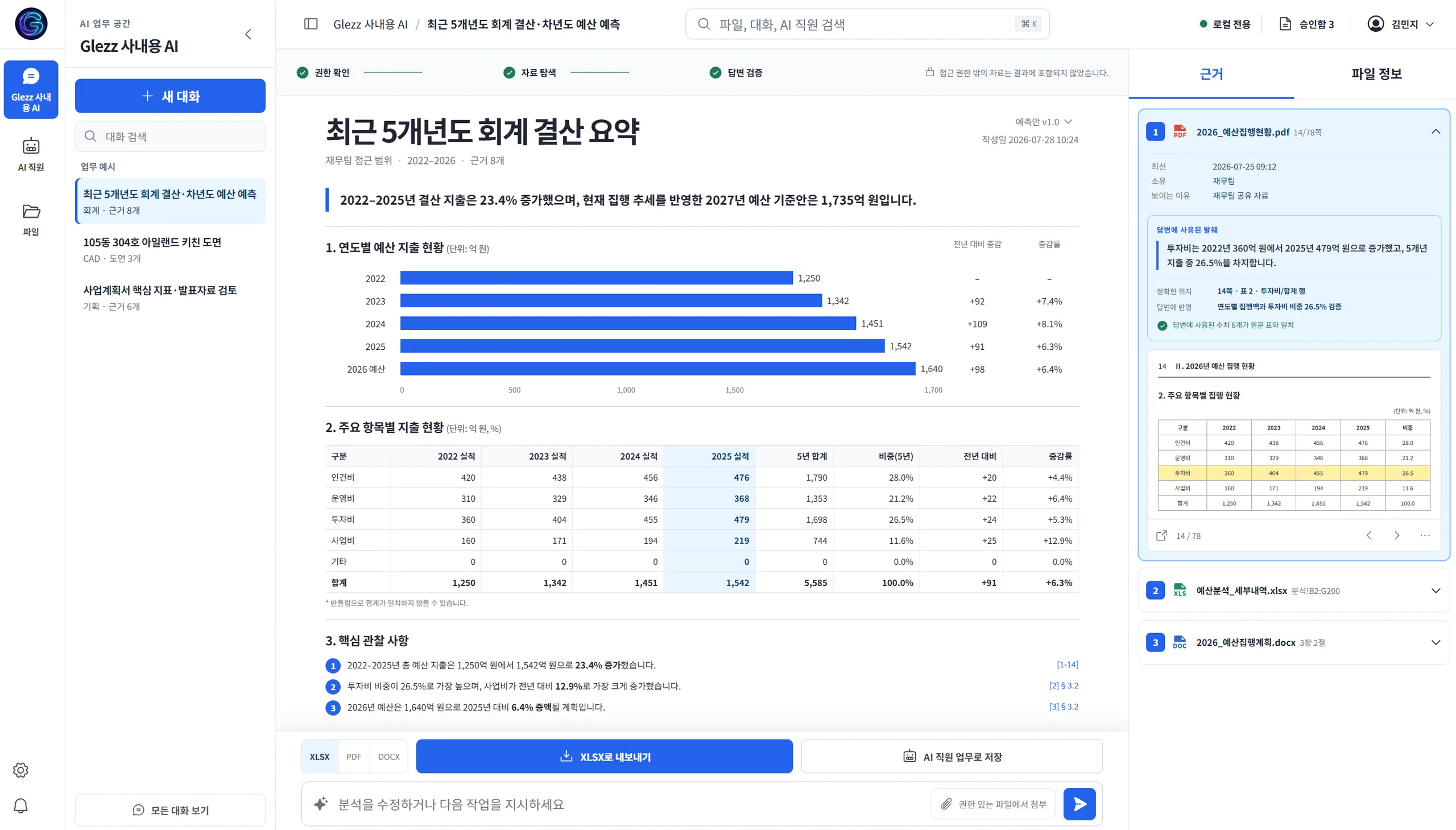
Your documents live on a server you own. The AI answers from them with citations, drafts your recurring paperwork, and never sees what an employee isn’t allowed to see. Files, backup, and remote work screens — one platform.
In production today at four small offices in Korea — 5 to 12 people each
Read their storiesHeard in real onboarding conversations — translated from Korean.
“The PC that held our shared folder died and we could not open our files. Something like this happens every few years and it keeps me up.”
“Expense reports and approval forms mean typing the same things again every time. Fitting the template and double-checking takes longer than you would think.”
“Out in the field I suddenly need a file that lives on my office PC. Just asking someone to send it over is a chore.”
Meanwhile, your team already uses AI — on personal accounts, with no record of which company files went along.
“Where is last year’s contract?”
“Expense report time.”
“Can someone send me that file?”
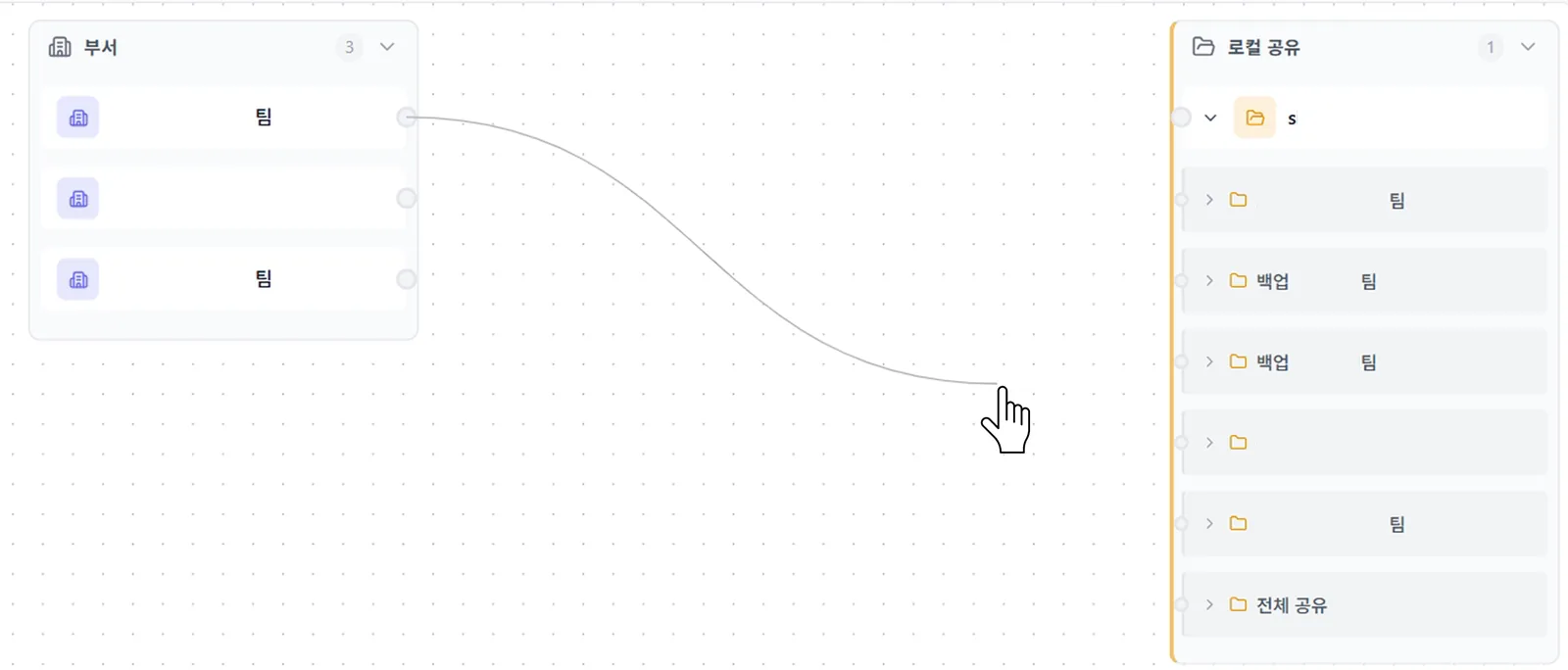
No migration project. Connect the storage you already use, and who can see which folder carries over unchanged.
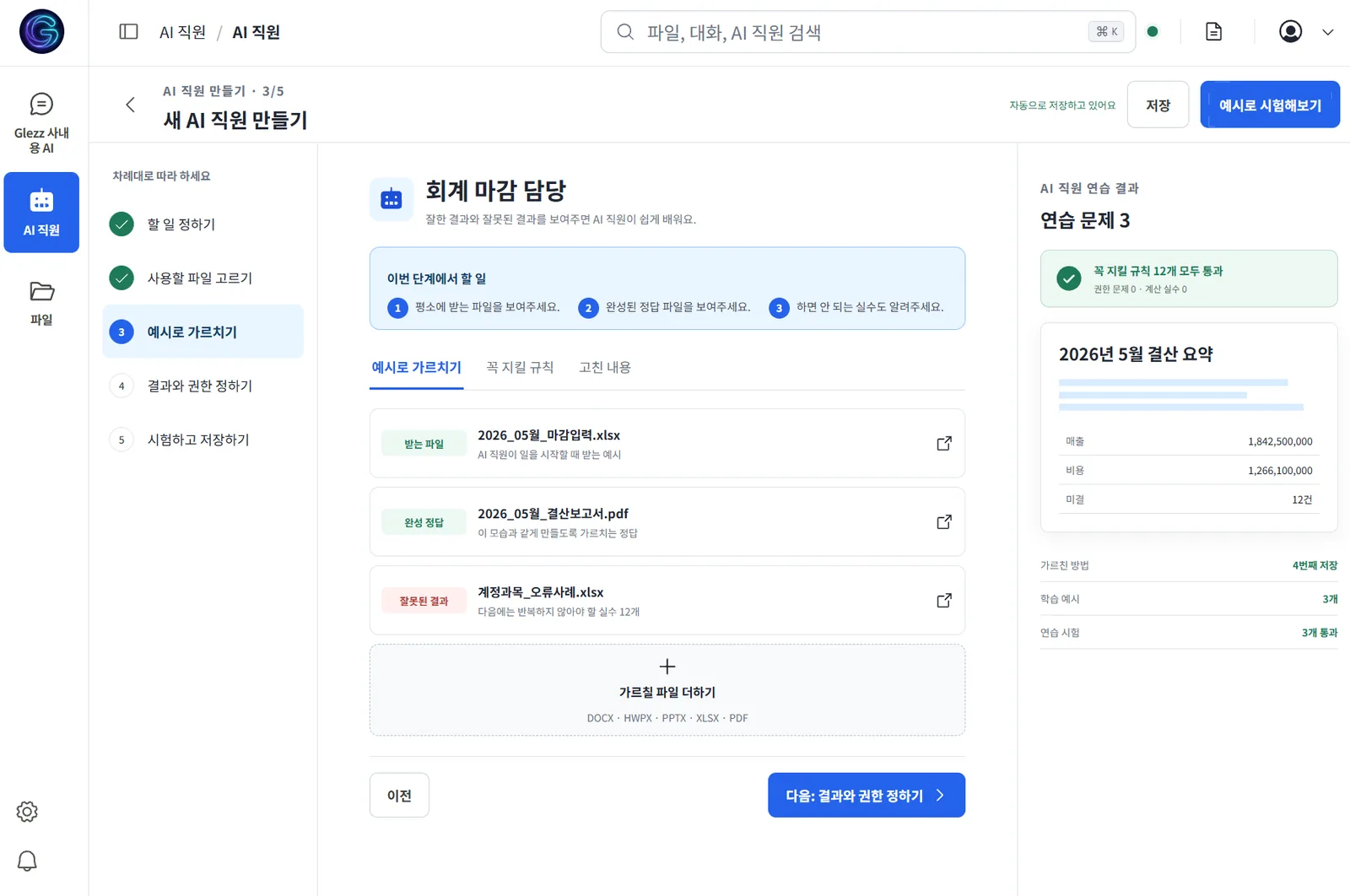
Expense reports, weekly summaries — hand recurring documents to the AI staff. Unlike a new hire, you teach it once. After that it is one button.
Every employee gets a company work screen. Open it from home or the field — the files never leave the office.
Your office computer, from anywhere — Learn more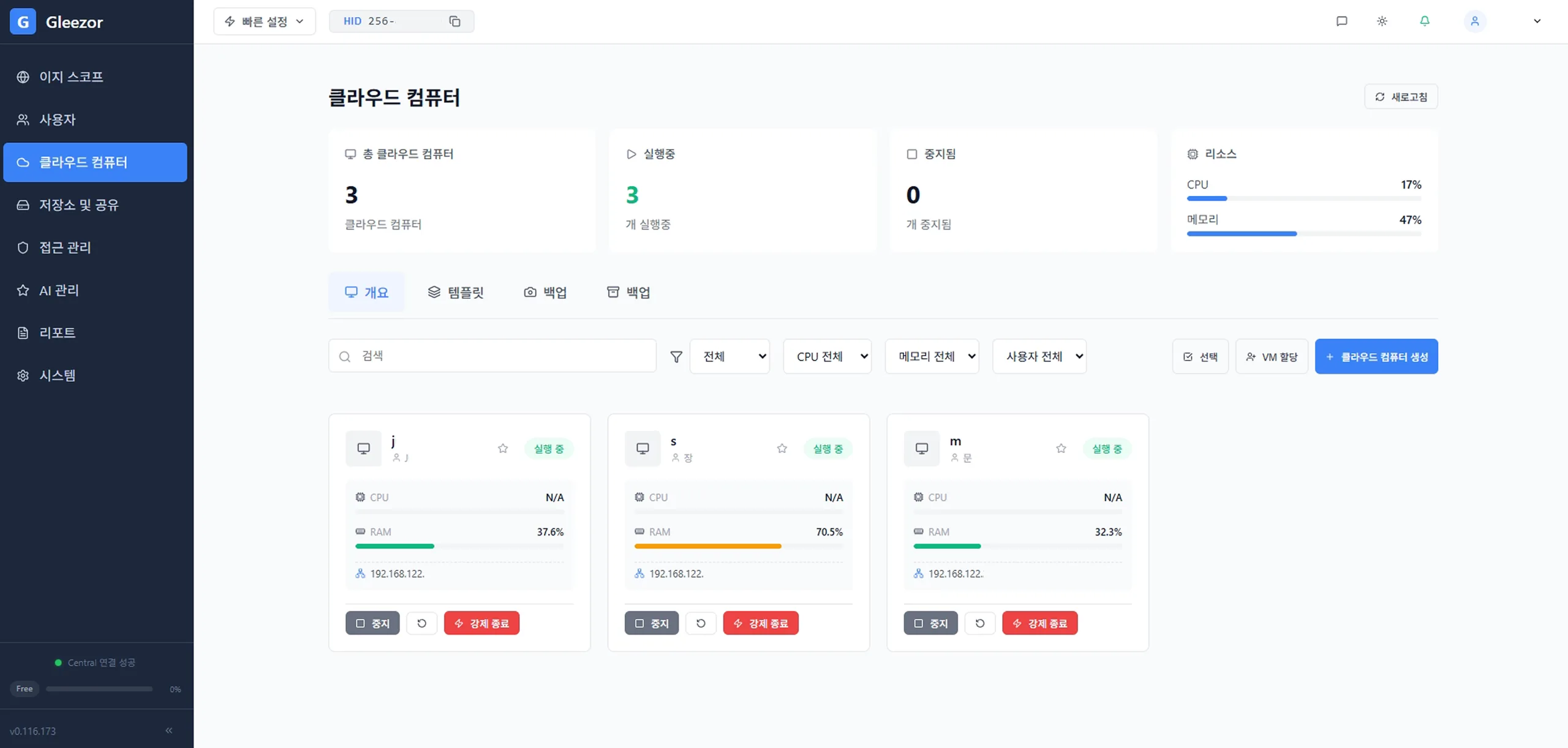
All three run on one machine. Tell us about your office and we’ll show you the screens.
Talk to salesPermissions
A new hire gets permissions on day one — so does your AI. If an employee cannot open a file, the AI will not use it in their answer. Revoke access, and it is out of the very next answer.
It checks what you are allowed to see before it answers — and shows which document and page it used.
Set the processing location per document type. Sensitive documents can be pinned to in-house-only — a policy, not a promise.
Contracts · Payroll · HR records
Processed by the AI inside your office. Nothing leaves the building.
Meeting notes · Email drafts · Weekly reports
Heavy computation runs on Gleezor’s machines, so you never buy an expensive GPU box.
Market research · Complex analysis
Only the question and the few lines it needs are sent. The document file itself never goes out.
Personal identifiers are masked automatically before anything is sent out — and if masking fails, nothing is sent at all.
Support record
When we work on your systems, an employee approves it on screen first. Everything we do is recorded as video, and that record cannot be edited or deleted — by us or anyone.
Consent first
Nothing starts until an employee clicks Approve on screen.
Screen recording
What we did is captured exactly as it happened.
Tamper-proof log
The record cannot be edited or deleted afterwards — by anyone.
| Item | Suite AI add-ons | Microsoft Copilot | DIY NAS + AI | Gleezor |
|---|---|---|---|---|
| Cost | Per-seat fees, and AI is an extra charge on top | $30 per user/month, and the M365 plan is separate | Hardware upfront, then usage fees or another GPU purchase | From $9 per user/month, flat — no surprise growth |
| Your original files | Only what lives inside that tool | Must move to their cloud | Visible | Visible — nothing migrates |
| Sensitive documents | Processed on someone else’s computer | Processed on someone else’s computer | Cheaper models send them out | Can be kept strictly in-house |
| Per-employee permissions | Managed separately inside the tool | Exposure risk if permissions are messy | Folder inheritance | Exactly your folder rules. Block someone — it applies instantly |
| Management | You manage it | You manage it | You build and manage it | We manage it, and every action is logged |
Official list prices as of August 2026. Microsoft 365 Copilot per Microsoft’s official pricing, base M365 plans billed separately. Local AI on consumer NAS assumes a separate GPU purchase per each vendor’s official guidance. Gleezor pricing per our published plans.
The screens settle it faster than the table does.
Every plan runs the same software.
Answers with citations, within each person’s permissions
Expense reports and summaries in one click
All company files in one place
Mistakes roll back to yesterday
One company screen per employee
Same screen from home or the field
Revoke a permission — AI answers change instantly
A browser tab, not a server room
The day-to-day changes are above. This is what changes for the company.
| Item | Before | Gleezor |
|---|---|---|
| File storage | Scattered across employee PCs | One company server |
| Disaster readiness | Nobody owns backups | Automatic, three layers deep |
| What AI can see | The same for every employee | Exactly each person’s permissions |
Same software, two licenses.
For individuals and SOHO. Install it yourself, on hardware you already own — today.
For offices of 10–49 that want it managed: setup, training, and operations handled for you.
Tell us how your office works. We show you the real screens — and which jobs the AI staff can take. Decide after that.
Your existing files and folder permissions connect as they are. We walk your team through the screens.
Questions get handled remotely, every support action is logged, and you can watch backups succeed on screen.
Real customer sentences, translated from Korean.
“We once lost everything at once sharing files over a plain shared folder. Now we store and share without worrying about it.”
“We switched when our staff PCs were due for replacement. It costs less than buying everyone a machine, and it is easier to manage.”
“We are out of the office a lot and file sharing has to be instant. From outside, my laptop goes straight into my office computer.”
“Documents used to live on each person’s machine and took forever to find. Now sharing is organized and everything is in one place.”
Free for NAS
$0
Personal — start free
Basic
$9
/user/mo
Files + company-document AI
Team
Most popular$16
/user/mo
Up to 10 cloud computers
Business
$25
/user/mo
Unlimited cloud computers
Premier
Quote
Hardware, setup, and operations included
Prices exclude tax. Billed per user.
AI that works inside your company server. Teach it a recurring document once — an expense report, a weekly summary — and from then on it drafts it in one click. Like any employee, it gets permissions and works only within them.
No. You connect the storage you already use. Folder boundaries between teams stay exactly as they are.
Yes. Setup and training are done for you on business contracts, and day-to-day management is one browser tab. Operations support is included.
Documents are stored on your company server. You can pin sensitive documents to in-house-only AI, and files an employee cannot open are never used in their answers. Block someone’s access and it applies to the AI the same moment.
One person, free, self-installed. For offices of 10–49 people we recommend Gleezor Enterprise.
Yes. The virtual demo shows real screens right now, and a trial period comes before any contract.
A personal ChatGPT account knows nothing about your folder permissions. Whoever pastes, payroll and contracts go along — and the company never finds out. Gleezor answers within each employee’s permissions, and sensitive documents can be kept from ever leaving the building.
Anything else? Ask us directly.
The virtual demo is the actual console — not a mockup.